




Follow HMM container ships on ShipFinder using a vessel name, IMO number or MMSI. Check the latest reported position and ETA, review previous port visits, and receive notifications for movements relevant to your work.
For shipment monitoring, confirm the vessel carrying your container on the current leg. HMM ship tracking then helps you compare its reported movements with the sailing schedule and your transport arrangements.
Identify the HMM Ship You Want to Track
HMM Vessel Names and IMO Numbers
HMM's container fleet includes ships of different sizes. Two examples listed in the official HMM fleet directory are:
HMM ALGECIRAS — IMO 9863297: Listed capacity of 23,964 TEU.
HMM NURI — IMO 9869162: Listed capacity of 16,010 TEU.
Both can be identified by their full names or IMO numbers. Their capacities describe vessel specifications, not the number of containers currently aboard.
If you are following cargo, use the ship named in your current transport records. A familiar HMM vessel name is only useful if it matches the voyage you need to monitor.
Searching for Hyundai Merchant Marine?
HMM was formerly named Hyundai Merchant Marine and adopted the HMM name in 2020, as recorded in its company history.
You may encounter the former name in older shipping documents or articles. For a vessel search, check the ship's current name or use its IMO number to confirm its identity.
Track an HMM Vessel on ShipFinder
Step 1: Search by Vessel Name, IMO Number or MMSI
Check your shipment records, HMM's tracking information or your freight forwarder's latest update for the carrying vessel.
Enter its name, IMO number or MMSI in ShipFinder's search bar and select the matching result.
For example, to look up HMM ALGECIRAS, search its full name or 9863297. The vessel information card lets you confirm that you have selected the intended ship.
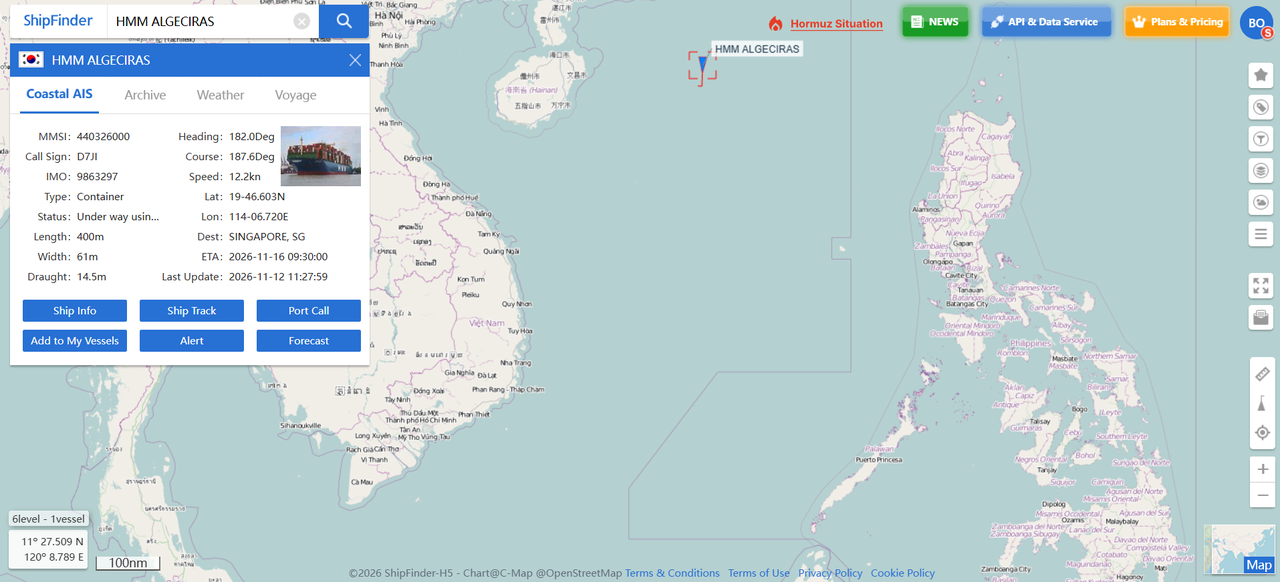
Step 2: Read the Latest Position and ETA
Check the vessel information card for the latest reported position, speed and course. Read the position alongside its timestamp to establish when that location was recorded.
Then review the destination and estimated time of arrival. Confirm which port the ETA refers to before comparing it with your shipment schedule. A ship’s reported destination may differ from your container's discharge port.
Step 3: Check the Track and Recent Port Calls
Review historical tracks to see where the vessel has sailed during the available period. Port call records add arrival and departure information for previous visits.
Together, these records help explain the movements leading up to the latest position. You might check the most recent departure, then follow the recorded route afterward. Playback lets you replay the vessel's recorded movements.
The historical period available depends on your plan. Vessel records describe the ship's activity; they do not establish whether a particular container was loaded or discharged.
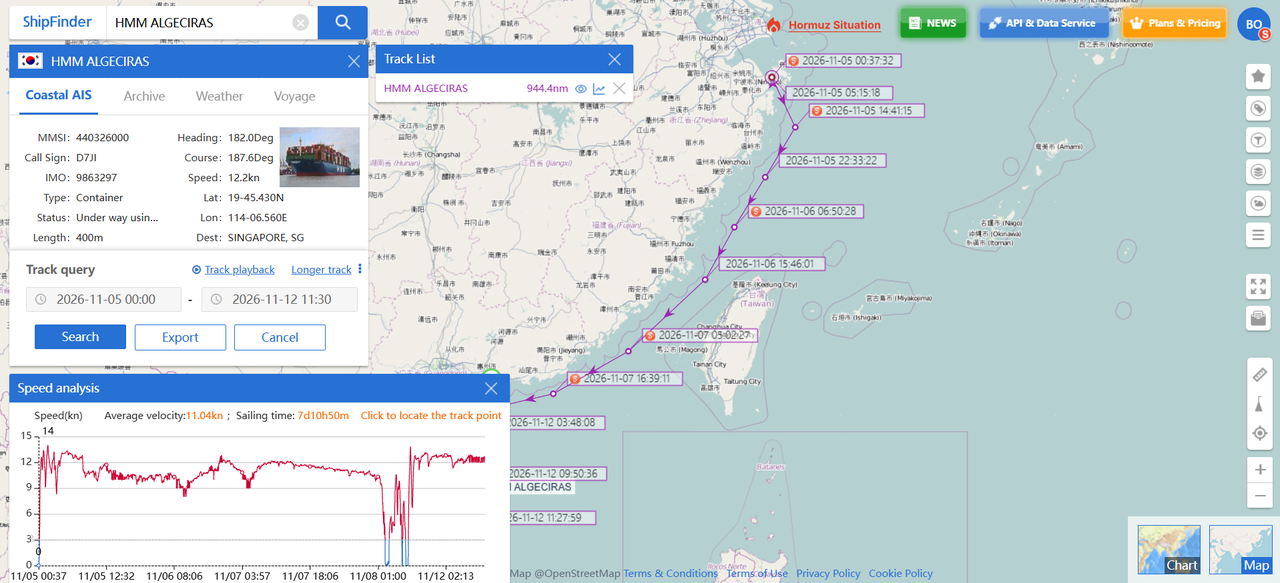
HMM Ship Historical Tracks
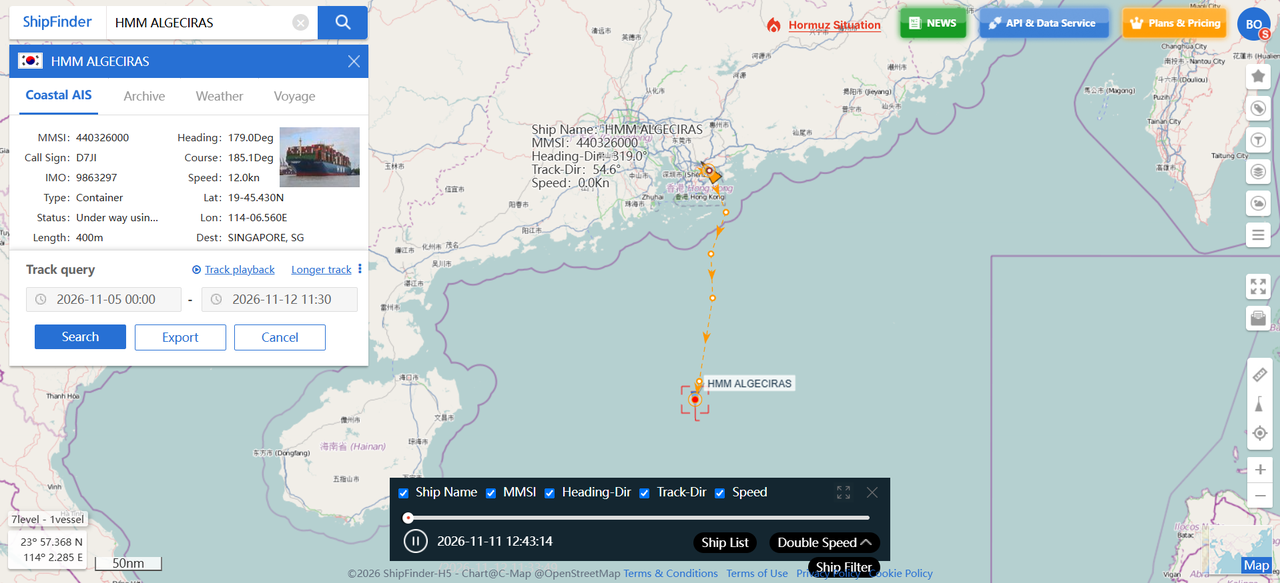
HMM Ship Historical Playback
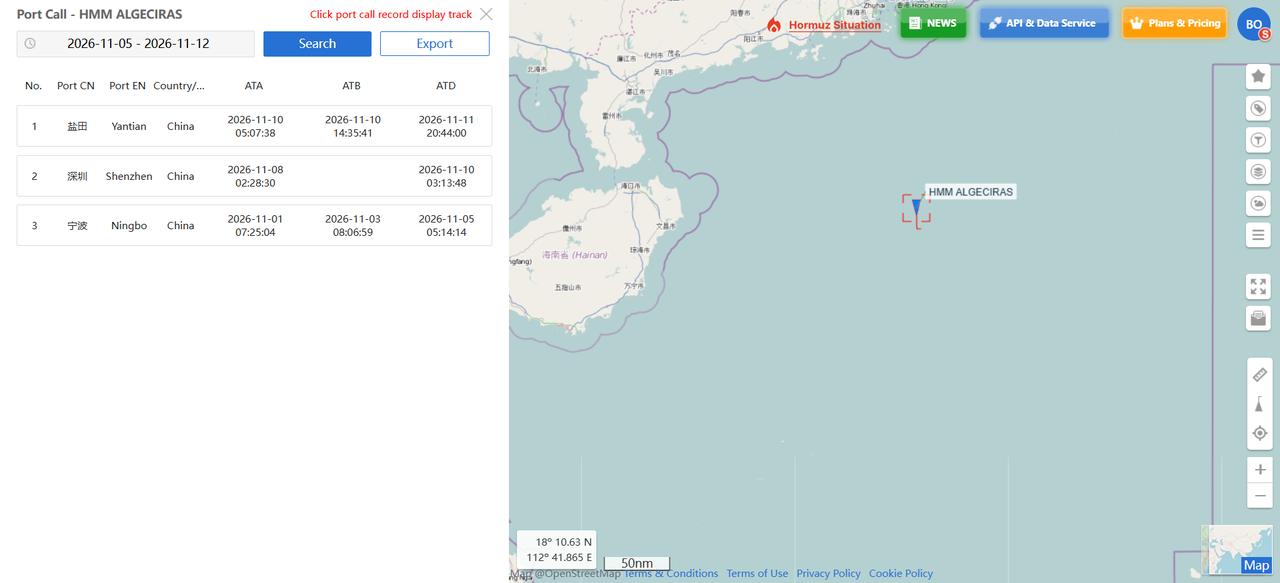
HMM Ship Port Calls
Step 4: Add the Vessel to Satellite Tracking
Terrestrial AIS receivers provide reports within coastal coverage. Satellite AIS supports tracking when a vessel sails beyond the range of shore-based receivers.
Make sure your account has an available satellite tracking slot, then add the vessel to satellite tracking. Without this enabled, your account may continue to display its last terrestrial AIS position while it is offshore.
The free Basic plan includes satellite AIS tracking for one designated vessel. See the ShipFinder plan comparison if you need to follow more ships offshore or access a longer history.
Compare HMM Sailing Schedules with Reported Vessel Movements
Check the Schedule for the Correct Vessel and Voyage
HMM's official schedule search includes options to search by vessel name and port. Use the relevant result to review planned calls and arrival or departure times.
Check the voyage and dates as well as the ship's name. A vessel can make repeated calls at the same port, so an entry from another sailing may not apply to your shipment.
Distinguish Planned Calls from Recorded Activity
Schedules describe planned movements. AIS positions and historical tracks show reported movements, while port call records help you review previous visits.
Compare these sources when following a departure or an approach to port. A reduction in speed does not, on its own, establish that a vessel is delayed by congestion. Similarly, entry into a port area does not confirm that the ship has berthed or begun unloading.
If the information appears inconsistent, check the timestamps and consult the carrier's latest schedule updates before changing your arrangements.
Confirm Cargo Progress Separately
Use HMM's cargo tracking information for shipment-specific events. A vessel's arrival and a container's availability for collection are separate milestones.
If your container changes ships during transshipment, confirm the onward vessel and transfer status through your transport records or freight forwarder. Update your monitoring list once the relevant vessel has been confirmed.
Follow HMM Port Approaches and Departures with Alerts
Set Notifications for Relevant Vessel Events
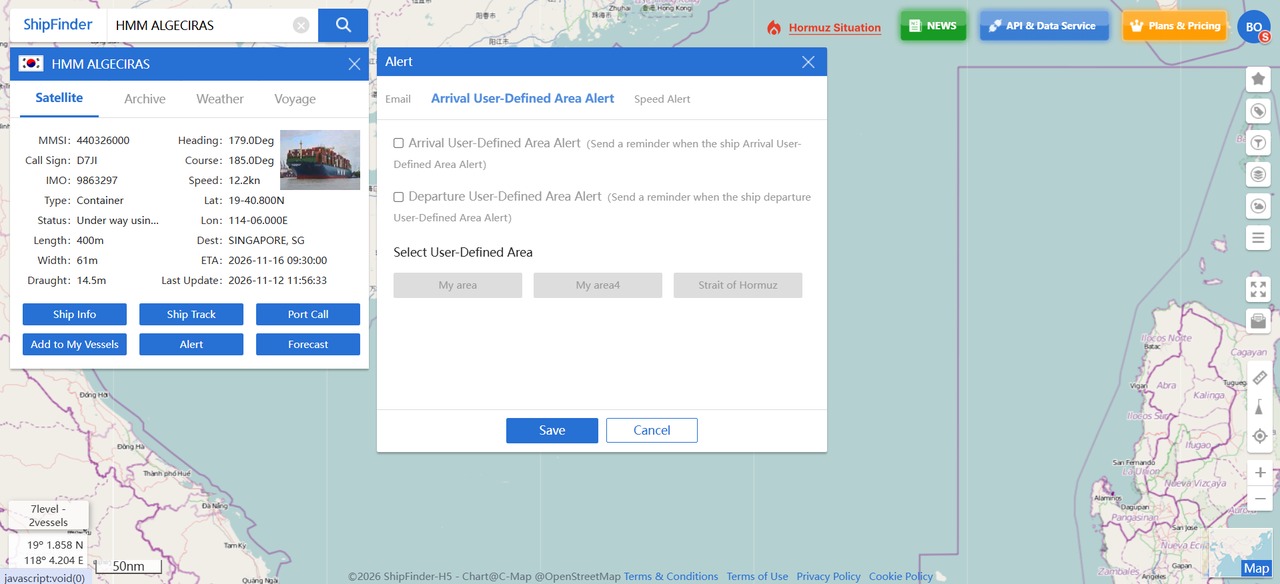
Configure email alerts for arrivals, departures, area entry or exit, and speed changes. Select the events you need to follow and set the notification email address.
An area-entry alert can prompt you to check a vessel approaching a port without repeatedly refreshing the map. Review its latest position and the relevant shipment information before updating onward plans.
These notifications concern vessel activity. They do not confirm container discharge, customs clearance or release for collection.
Keep Regularly Monitored Ships in a Fleet
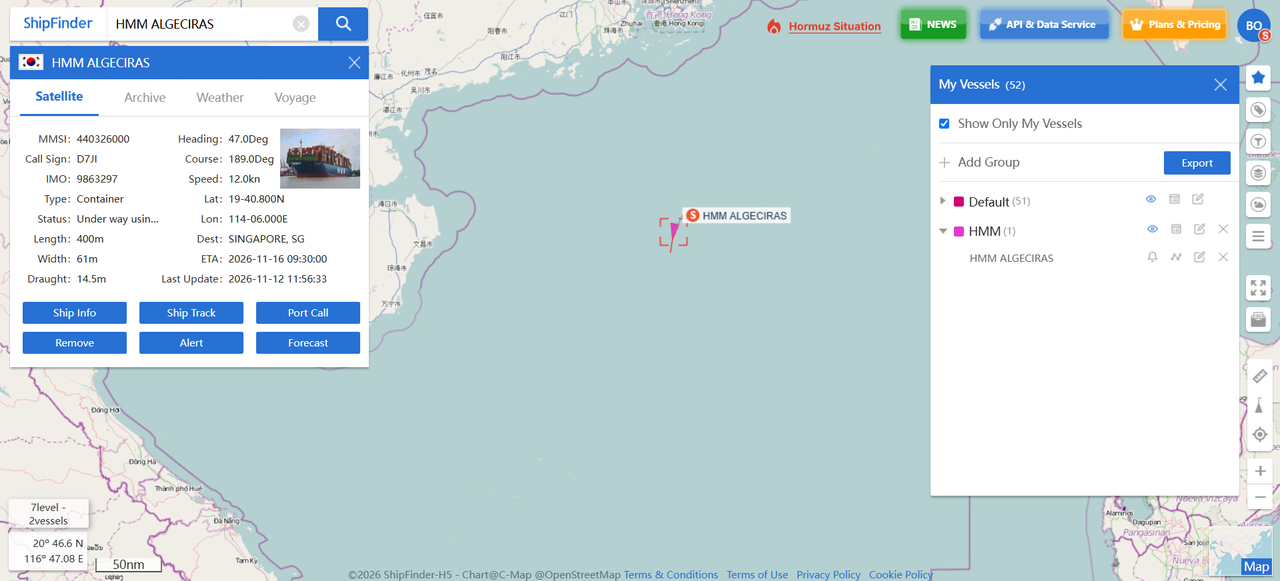
Add HMM vessels you follow regularly to a fleet so you can return to their positions without repeating individual searches.
Keep the list aligned with active voyages and update it when vessel assignments change. Fleet management organizes the ships you monitor; satellite tracking is a separate setting for receiving their offshore reports.
Start Tracking an HMM Vessel
Search for an HMM vessel on ShipFinder to check its latest position, destination and ETA. Create a free account to organize the ships you follow and activate satellite AIS tracking for one designated vessel.
FAQ
Is HMM ship tracking free on ShipFinder?
Yes. You can search for ships and check their positions for free. A free Basic account also includes three days of historical tracks, satellite AIS tracking for one designated vessel and fleet management for up to 10 vessels.
Is HMM the same as Hyundai Merchant Marine?
Yes. Hyundai Merchant Marine changed its name to HMM in 2020. When searching for a specific ship, use its current vessel name, IMO number or MMSI.
Can I track an HMM ship using a container number?
Use HMM's cargo tracking service to look up a container and identify the carrying vessel. ShipFinder's vessel search uses ship names, IMO numbers or MMSIs rather than container numbers.
Why is an HMM vessel still showing an older position?
Check the report timestamp and, if the ship is offshore, its satellite tracking settings and your account's available capacity. Transmission intervals, reception and data delivery can also affect updates. An older position alone does not confirm a voyage delay.